---
title: "Connect Google Search Console to ChatGPT · gscdump"
description: "Connect Google Search Console to ChatGPT with gscdump. Open it in ChatGPT Plugins, select Install plugin, approve access, then ask about your Sites."
canonical_url: "https://gscdump.com/mcp/chatgpt"
meta:
"og:description": "Connect Google Search Console to ChatGPT with gscdump. Open it in ChatGPT Plugins, select Install plugin, approve access, then ask about your Sites."
"og:image": "https://gscdump.com/_og/s/o_2f77db8e24c773c9.png"
"og:image:height": "600"
"og:image:type": image/png
"og:image:width": "1200"
"og:title": "Connect Google Search Console to ChatGPT · gscdump"
"twitter:image": "https://gscdump.com/_og/s/o_2f77db8e24c773c9.png"
---
> Index of every page on this site: [llms.txt](https://gscdump.com/llms.txt)
# Connect Google Search Console to ChatGPT
Open gscdump in ChatGPT Plugins and select Install plugin. ChatGPT then answers from your Search Console record, kept past Google's 16-month window.
[**Open gscdump in ChatGPT**](https://chatgpt.com/plugins/plugin_asdk_app_6ac71bf470188191a736feaa2f0c8c6c) [** Check your connection **](https://gscdump.com/learn-google-search-console/ai-agents/mcp-server)
- Free during beta
- No card
- [Read-only Google access](https://gscdump.com/trust)
- [Open-source engine (MIT)](https://github.com/harlan-zw/gscdump)
[](https://gscdump.com/mcp-captures/chatgpt-answer.webp)
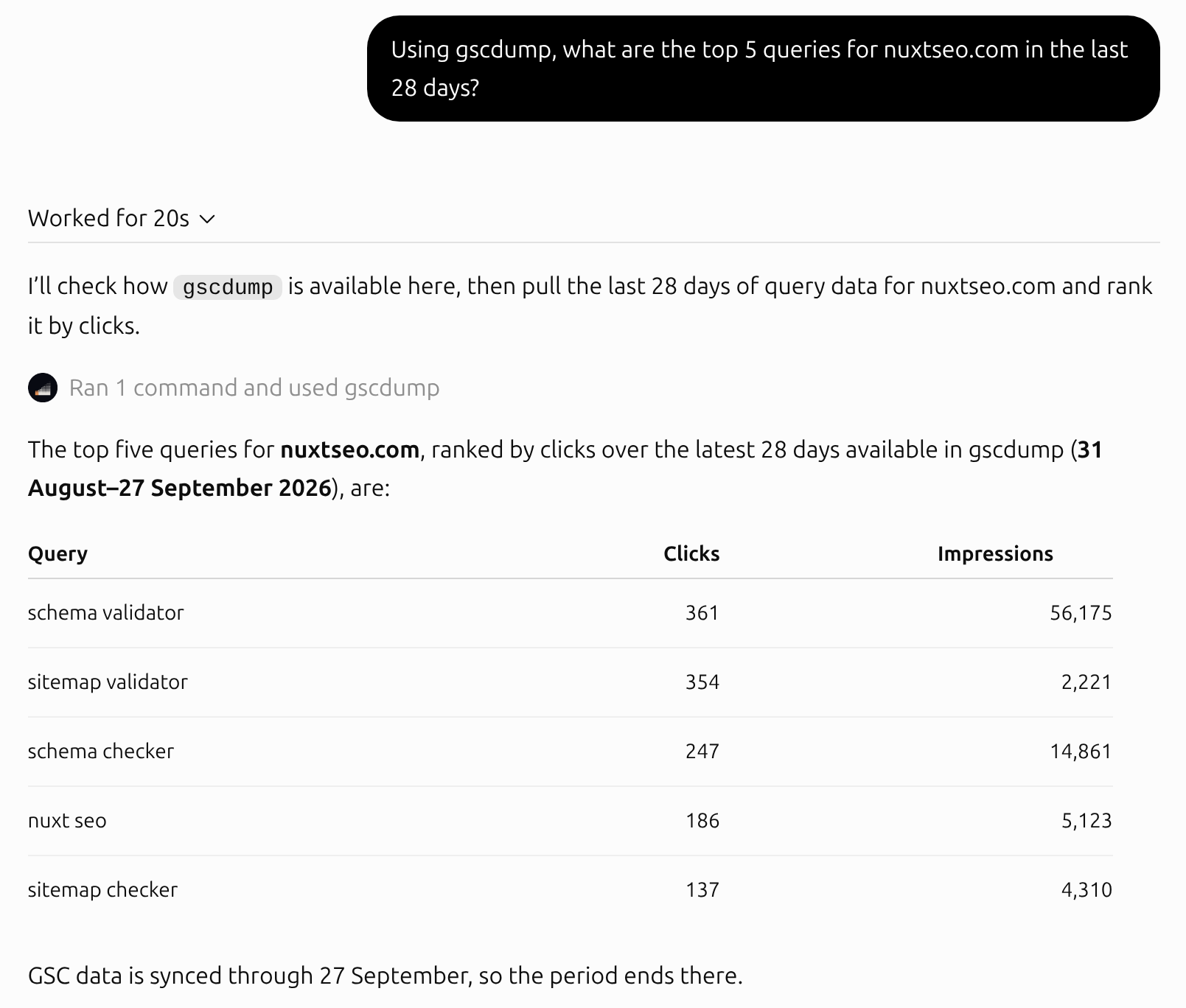
*ChatGPT on the web, asked for the top 5 queries on nuxtseo.com. The rows cover 31 August to 27 September 2026, the same five Claude returned. Captured 29 September 2026. [Open full size](https://gscdump.com/mcp-captures/chatgpt-answer.webp)*
## Connect ChatGPT to gscdump
1. 1 ### Open gscdump in ChatGPT Plugins Open [gscdump's listing in ChatGPT Plugins](https://chatgpt.com/plugins/plugin_asdk_app_6ac71bf470188191a736feaa2f0c8c6c) on the web. If ChatGPT asks you to sign in, sign in to ChatGPT first.
2. 2 ### Select Install plugin Select Install plugin, and ChatGPT sends you to gscdump. If you are new to gscdump, sign in with Google and connect the Site you want to ask about. On Google's screen, keep the Search Console box ticked.
3. 3 ### Approve access gscdump lists the Sites ChatGPT will read. Select Allow access, and gscdump returns you to ChatGPT. [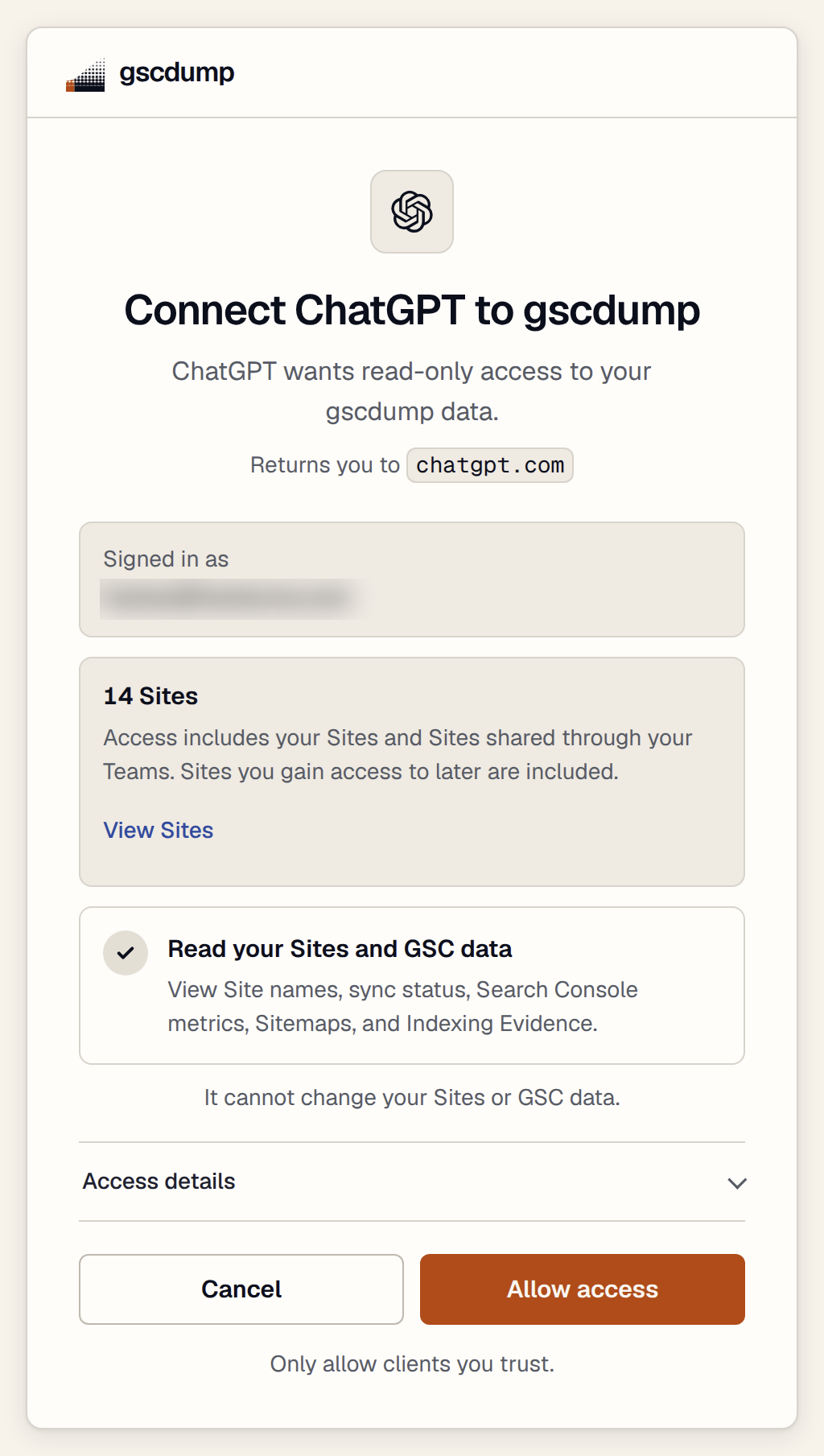](https://gscdump.com/mcp-captures/consent-chatgpt.webp)
*gscdump's approval page. ChatGPT gets read-only access and cannot change your Sites or Search Console data. Captured 29 September 2026. [Open full size](https://gscdump.com/mcp-captures/consent-chatgpt.webp)*
4. 4 ### Ask a question Start a new chat. Type `@` in the prompt box, select gscdump, and ask about a Site by name, as in the answer at the top of this page.
## What to ask first
Ask about your Sites in your own words. These questions are a place to start.
- Which of my Sites lost the most clicks this week?
- Which queries sit at positions 4 to 20 with high impressions?
- Is my home page indexed by Google? Show the verdict and the date.
- Compare this quarter with the same quarter last year.
## If ChatGPT cannot install the plugin
Add gscdump as a custom MCP server with developer mode instead. OpenAI lists developer mode for Plus, Pro, Business, Enterprise, and Education accounts on the web.
1. 1 ### Sign in and connect a Site Sign in to gscdump with Google, then [connect the Site](https://gscdump.com/app/onboarding) you want to ask about.
2. 2 ### Turn on developer mode In ChatGPT on the web, open Settings, then Security and login, and turn on Developer mode. If developer mode is off, the plus menu on the Plugins page can offer only Create plugin and Upload plugin.
3. 3 ### Add the MCP server Open [ChatGPT Plugins](https://chatgpt.com/plugins), select the plus button, then Add custom MCP server. Some accounts show Create MCP App instead. Name it gscdump and set the server URL to `https://gscdump.com/mcp`. Choose OAuth, accept the risk warning, and create the server. For the icon, [download the gscdump icon](https://gscdump.com/mcp-icon.png). [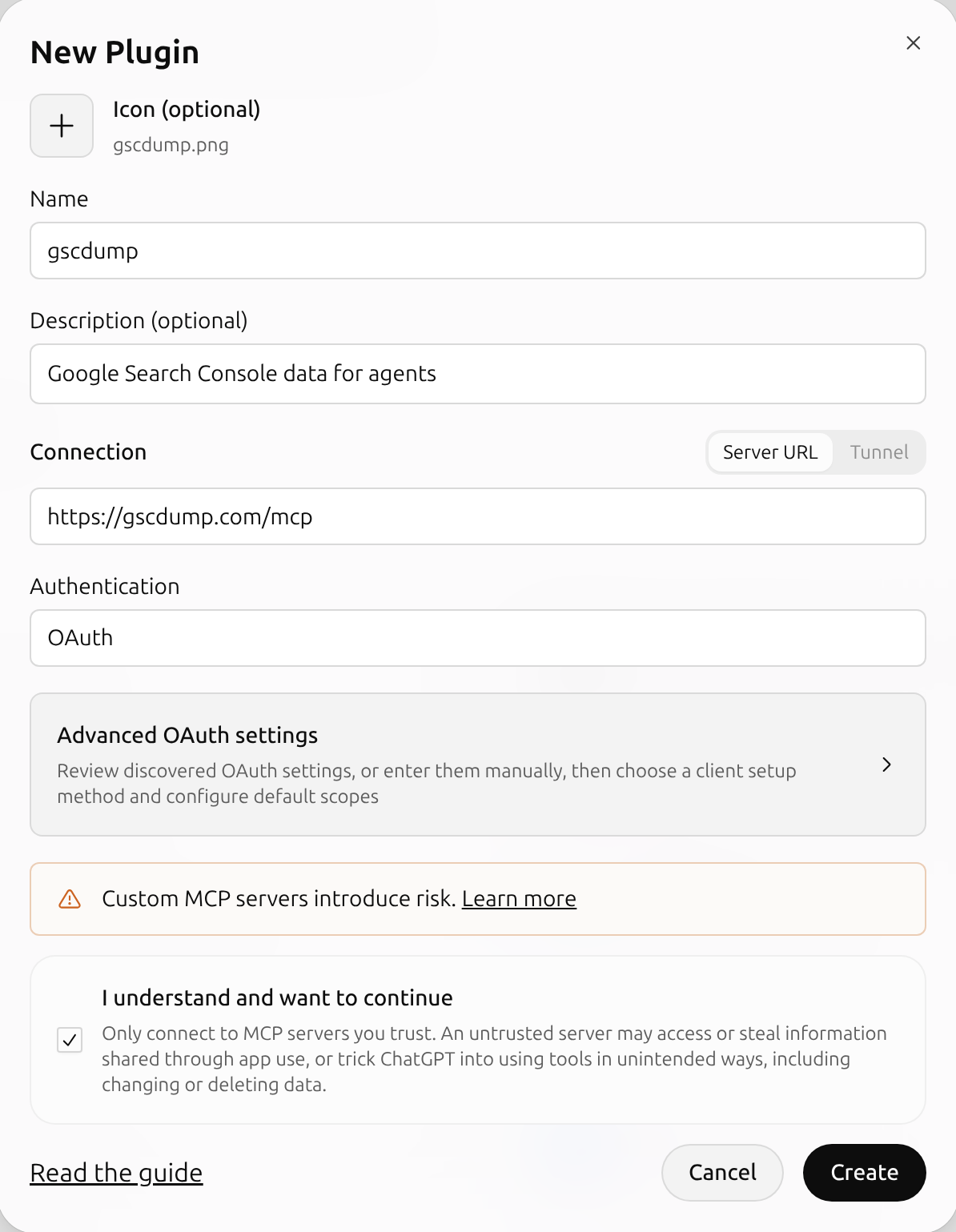](https://gscdump.com/mcp-captures/chatgpt-create-app.webp)
*ChatGPT's form, filled in for gscdump. At this capture, the menu item was Create MCP App. The optional icon must be a PNG of 256 px or more and 10 KB at most. Captured 29 September 2026. [Open full size](https://gscdump.com/mcp-captures/chatgpt-create-app.webp)*
4. 4 ### Connect ChatGPT shows Connect gscdump. Select Continue to gscdump. [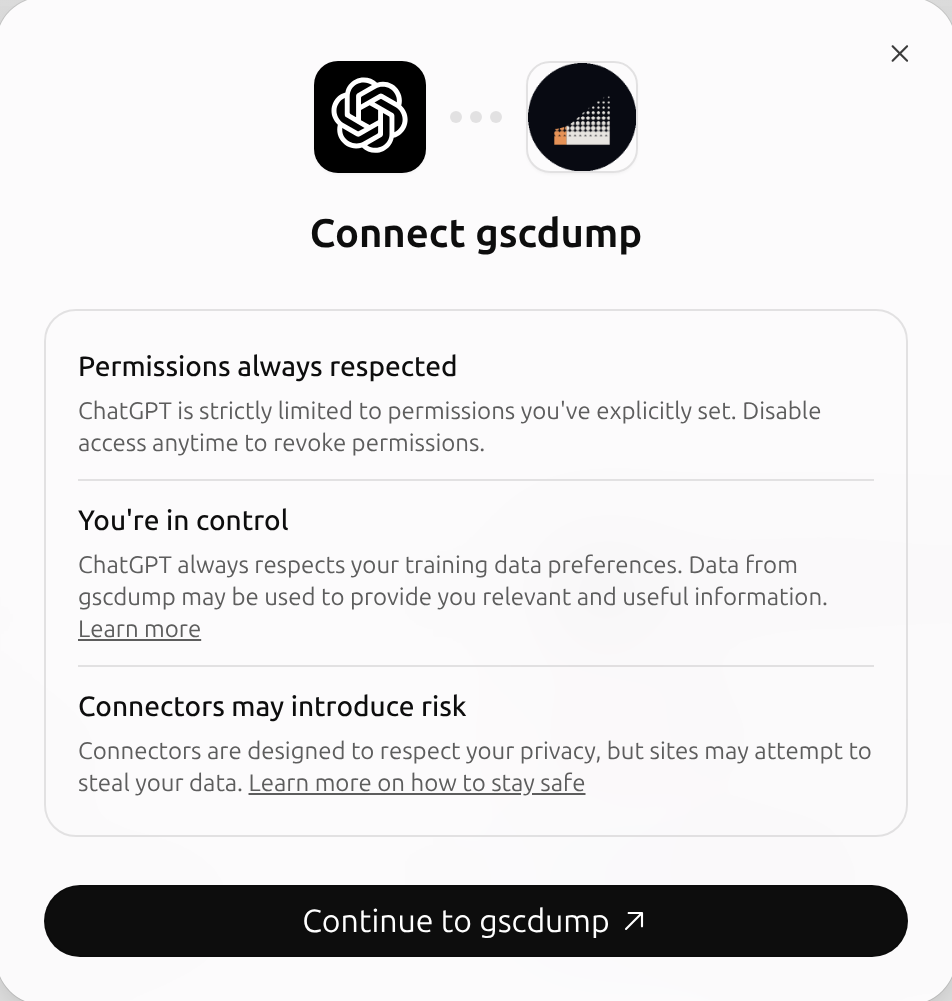](https://gscdump.com/mcp-captures/chatgpt-connect.webp)
*ChatGPT's connect dialog, shown after you create the server. Captured 29 September 2026. [Open full size](https://gscdump.com/mcp-captures/chatgpt-connect.webp)*
5. 5 ### Approve access and ask gscdump lists the Sites ChatGPT will read. Select Allow access, and ChatGPT installs gscdump. Then ask in a new chat, as in step 4 above.
## More questions for ChatGPT
Ask in your own words. ChatGPT picks the MCP tool from your question. Each row below is a question and the gscdump MCP tool that answers it. Replace example.com with your Site.
- list-sites
- Which Sites can you read, and which dates are synced?
- get-analytics
- How did clicks and impressions for example.com change over the whole record? Which week was the peak?
- get-keywords
- Which search queries brought the most clicks to example.com in the last 28 days?
- get-pages
- Which pages on example.com had the most impressions last month?
- get-page-details
- Show daily clicks for example.com/pricing since January, and the queries that showed it.
- get-keyword-details
- Which pages appeared for the query "pricing api", and how did its position change?
- get-countries
- Compare clicks by country for example.com in the last 90 days.
- get-devices
- Compare mobile and desktop CTR for example.com.
- run-report
- Which queries on example.com moved most against the previous period? Show the rows.
- list-sitemaps
- List the sitemaps for example.com with their errors and warnings.
- get-indexing
- How many inspected URLs on example.com are indexed, and how old are the results?
- inspect-url
- Is example.com/blog/launch indexed? When did Google last crawl it?
## What ChatGPT can read
Evidence tools declare read-only access. `submit-feedback` and `record-agent-outcome` write reports. OAuth connections require `feedback:write` approval for both writes. `submit-indexnow` sends URLs to IndexNow. It needs `indexnow:write`, which the user must tick on the consent page.
Analytics answers come from your preserved record, which keeps the days gscdump synced after Google deletes them at 16 months. A Site covers the exact host you registered, so totals can be lower than a broader Search Console property.
`inspect-url` asks Google at the time you ask, and uses the URL Inspection quota. `inspect-sitemap` also asks Google live for a Google sitemap. The [Google Search Console MCP server](https://gscdump.com/mcp) page lists every MCP tool.
## Troubleshooting
- The plus menu has no Add custom MCP server
- This menu item belongs to the developer mode steps. Turn on Developer mode under Settings, then Security and login. On a Business, Enterprise, or Education workspace, ask an admin whether the workspace allows custom MCP servers.
- ChatGPT cannot connect to the server
- If you added gscdump with developer mode, check that the server URL is exactly
https://gscdump.com/mcp, including the /mcp path, and that authentication is OAuth.
- The approval page shows 0 Sites
- ChatGPT can read only the Sites you connect. Select Connect Sites, connect a Site, and gscdump returns you to the approval page.
- ChatGPT answers without gscdump
- Type
@ and select gscdump before you ask. You can also name the MCP tool, for example: "Use gscdump's get-keywords tool for example.com."
- An MCP tool is missing
- If you added gscdump with developer mode, open it on the ChatGPT Plugins page and select Refresh. ChatGPT then reads the current MCP tool list from the server.
- The last few days are missing
- Google normally makes Search Console data available after 2-3 days. Read Search Console data delay before you treat a recent day as lost traffic.
- The connection stopped working
- Follow check your MCP connection to find the step that fails.
## Questions
Open gscdump in ChatGPT Plugins on the web and select Install plugin. Sign in to gscdump with Google, connect a Site, and select Allow access. In a new chat, type @, select gscdump, and ask about your Site.
OpenAI lists developer mode for Plus, Pro, Business, Enterprise, and Education accounts on the web. Turn it on under Settings, then Security and login. On a workspace account, workspace permissions also apply, so an admin can block custom MCP servers. gscdump itself is free during beta.
No. gscdump syncs your Search Console data and backfills up to 16 months of available history. ChatGPT reads that record through MCP tool calls, so you upload no files.
As far back as your gscdump record goes. gscdump backfills up to 16 months of available history, then keeps each day it syncs after Google deletes that day.
Only the Sites you connected to gscdump, plus Sites shared with you through a Team. ChatGPT gets read-only access. Each MCP tool call checks your access to that Site again.
No. No MCP tool writes to Google or changes a Site. Evidence tools declare read-only access. submit-feedback and record-agent-outcome write reports. OAuth connections require feedback:write approval for both writes. submit-indexnow sends URLs to IndexNow. It needs indexnow:write, which the user must tick on the consent page.
ChatGPT's connect dialog says you can disable access at any time. If you disconnect a Site in gscdump, no agent can read it, and gscdump deletes its synced history.
Most free servers read Google live and store nothing, so they reach only the 16 months Google keeps. gscdump backfills up to 16 months of available history and keeps your record after Google deletes it. Open source: the engine, CLI, and SDK are MIT licensed on GitHub.
Google's BigQuery export starts empty on the day you turn it on, and it never backfills. gscdump backfills up to 16 months of available history when you connect a Site.
Google sign-in requests read-only Search Console access, plus your email address and basic profile. With read-only access, gscdump cannot change your Search Console data or settings. The trust page lists the exact scopes.
Hosted is free during beta and accepts up to 10 Sites. You need no card. After beta, Hosted keeps a free allowance. Prices appear on the pricing page before billing starts.
Ask ChatGPT about your Search Console record.
Free during beta.
[**Open gscdump in ChatGPT**](https://chatgpt.com/plugins/plugin_asdk_app_6ac71bf470188191a736feaa2f0c8c6c) [**Set up Claude**](https://gscdump.com/mcp/claude)
```json
{"@context":"https://schema.org","@graph":[{"@id":"https://gscdump.com/#website","@type":"WebSite","description":"gscdump syncs Google Search Console data, backfills up to 16 months of available history, and preserves your collected data for MCP, API, and SQL.","name":"gscdump","url":"https://gscdump.com/","publisher":{"@id":"https://gscdump.com/#identity"}},{"@id":"https://gscdump.com/mcp/chatgpt#webpage","@type":"WebPage","description":"Connect Google Search Console to ChatGPT with gscdump. Open it in ChatGPT Plugins, select Install plugin, approve access, then ask about your Sites.","name":"Connect Google Search Console to ChatGPT","url":"https://gscdump.com/mcp/chatgpt","isPartOf":{"@id":"https://gscdump.com/#website"},"potentialAction":[{"@type":"ReadAction","target":["https://gscdump.com/mcp/chatgpt"]}],"primaryImageOfPage":{"@id":"https://gscdump.com/#logo"}},{"@id":"https://gscdump.com/#identity","@type":"Organization","name":"gscdump","url":"https://gscdump.com","logo":{"@id":"https://gscdump.com/#logo"}},{"@id":"https://gscdump.com/mcp/chatgpt#/schema/faqpage/1","@type":"FAQPage","mainEntity":[{"@type":"Question","name":"How do I connect Google Search Console to ChatGPT?","acceptedAnswer":{"@type":"Answer","text":"Open gscdump in ChatGPT Plugins on the web and select Install plugin. Sign in to gscdump with Google, connect a Site, and select Allow access. In a new chat, type @, select gscdump, and ask about your Site."}},{"@type":"Question","name":"Which ChatGPT plans can add a custom MCP server?","acceptedAnswer":{"@type":"Answer","text":"OpenAI lists developer mode for Plus, Pro, Business, Enterprise, and Education accounts on the web. Turn it on under Settings, then Security and login. On a workspace account, workspace permissions also apply, so an admin can block custom MCP servers. gscdump itself is free during beta."}},{"@type":"Question","name":"Do I need to export a CSV from Search Console first?","acceptedAnswer":{"@type":"Answer","text":"No. gscdump syncs your Search Console data and backfills up to 16 months of available history. ChatGPT reads that record through MCP tool calls, so you upload no files."}},{"@type":"Question","name":"How far back can ChatGPT read?","acceptedAnswer":{"@type":"Answer","text":"As far back as your gscdump record goes. gscdump backfills up to 16 months of available history, then keeps each day it syncs after Google deletes that day."}},{"@type":"Question","name":"What can gscdump read?","acceptedAnswer":{"@type":"Answer","text":"Only the Sites you connected to gscdump, plus Sites shared with you through a Team. ChatGPT gets read-only access. Each MCP tool call checks your access to that Site again."}},{"@type":"Question","name":"Can ChatGPT change my Sites or Search Console settings?","acceptedAnswer":{"@type":"Answer","text":"No. No MCP tool writes to Google or changes a Site. Evidence tools declare read-only access. submit-feedback and record-agent-outcome write reports. OAuth connections require feedback:write approval for both writes. submit-indexnow sends URLs to IndexNow. It needs indexnow:write, which the user must tick on the consent page."}},{"@type":"Question","name":"How do I remove access?","acceptedAnswer":{"@type":"Answer","text":"ChatGPT's connect dialog says you can disable access at any time. If you disconnect a Site in gscdump, no agent can read it, and gscdump deletes its synced history."}},{"@type":"Question","name":"How is gscdump different from free open-source Search Console MCP servers?","acceptedAnswer":{"@type":"Answer","text":"Most free servers read Google live and store nothing, so they reach only the 16 months Google keeps. gscdump backfills up to 16 months of available history and keeps your record after Google deletes it. Open source: the engine, CLI, and SDK are MIT licensed on GitHub."}},{"@type":"Question","name":"How is it different from Google's BigQuery export?","acceptedAnswer":{"@type":"Answer","text":"Google's BigQuery export starts empty on the day you turn it on, and it never backfills. gscdump backfills up to 16 months of available history when you connect a Site."}},{"@type":"Question","name":"What access does gscdump get?","acceptedAnswer":{"@type":"Answer","text":"Google sign-in requests read-only Search Console access, plus your email address and basic profile. With read-only access, gscdump cannot change your Search Console data or settings. The trust page lists the exact scopes."}},{"@type":"Question","name":"Is it free?","acceptedAnswer":{"@type":"Answer","text":"Hosted is free during beta and accepts up to 10 Sites. You need no card. After beta, Hosted keeps a free allowance. Prices appear on the pricing page before billing starts."}}]},{"@id":"https://gscdump.com/#logo","@type":"ImageObject","caption":"gscdump","contentUrl":"https://gscdump.com/favicon.svg","inLanguage":"en","url":"https://gscdump.com/favicon.svg"}]}
```
## Sitemap
See the full [sitemap](https://gscdump.com/sitemap.md) for all pages.