Search Console branded queries: use the filter without overreading it
Separate branded and non-branded search traffic. Understand Google's classification, compare it with query matching, and check why the filter may be missing.
 Harlan Wilton
Use Google Search Console's branded queries filter when you want to separate searches associated with your brand from other searches. In the Search results Performance report, choose the branded or non-branded query view when it is available, then inspect the queries behind the totals.
Google's native classification includes brand names, spelling variations, and closely associated products. It can make mistakes. A branded total is a useful segment to investigate, rather than a complete count of people who already know your business.
Start with the queries behind the change
Keep the date range and search type fixed while switching between branded and non-branded views. Read clicks and impressions together, then inspect which queries changed.
For example, imagine your branded clicks stay steady while non-branded clicks fall. Your branded share would rise even though branded clicks hadn't grown. Reporting only the share would hide the decline you need to investigate.
Check the underlying click counts before describing stronger brand demand. Then look for the pages and search terms responsible for the change. The biggest query movers report compares the last 28 days with the 28 before. This is an interpretation workflow, not a claim that the filter measures audience familiarity directly.
A brand-name filter answers a different question
The ordinary Query filter matches text. You can reach it through Add filter → Query, then choose a matching option.
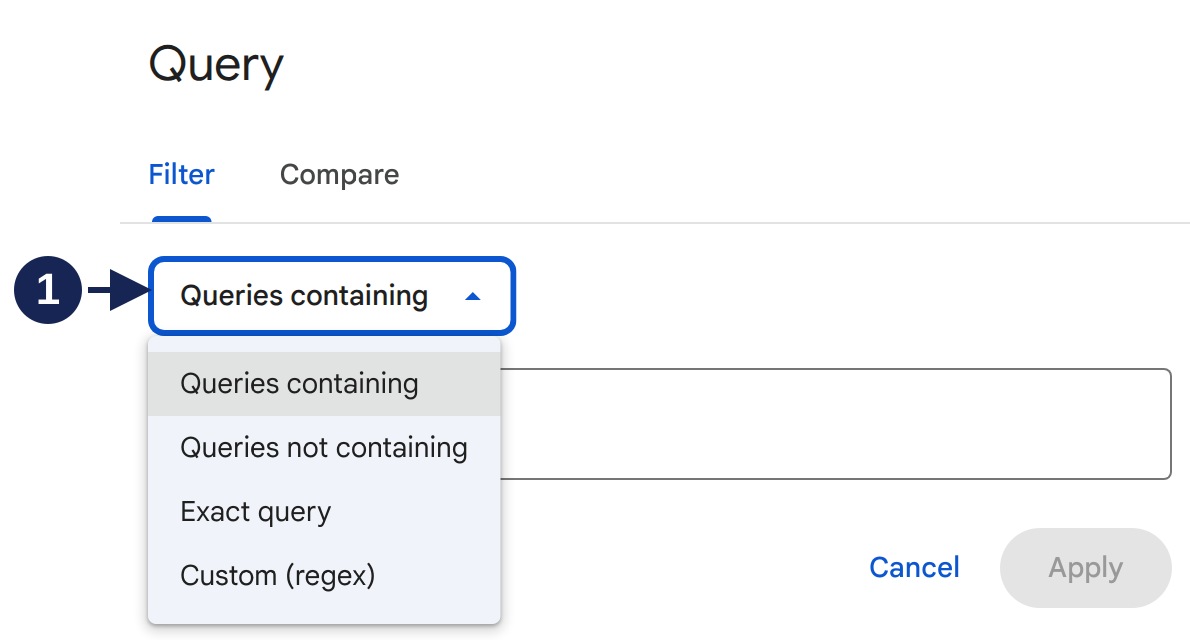
Open the query menu at full size.
Marker 1 identifies the matching selector. Queries containing finds a literal string; Custom (regex) lets you describe a pattern. Those controls can help you maintain your own definition of brand searches.
Consider a hypothetical company called “Cedar Tools” that sells a uniquely named product, “BranchPilot”. A filter containing Cedar Tools would miss BranchPilot searches. You could add that product name to a regular expression, but you'd still be maintaining your own list.
Google says its branded classification uses an internal AI-assisted system, rather than your regular expression. Don't label your text-matched total as Google's native branded total. If you change methods between monthly reports, record that change beside the comparison.
Check the filter's availability
Google's announcement was updated on 11 March 2026 to say the filter reached all eligible sites. Its eligibility guidance requires sufficient query and impression volume and excludes URL-path and subdomain properties. A top-level property can still lack enough data.
The property checked for these screenshots showed the ordinary Query controls but no native branded option. That observation doesn't identify which eligibility condition caused the absence.
If you use text matching as a fallback, name the matching rule in your report. It makes the numbers reproducible without implying access to Google's labels.
Don't expect every query total to reconcile
Google omits anonymized queries when a query filter is applied, and the query table doesn't contain every stored row. Adding visible query rows is therefore a poor way to reconstruct the unfiltered chart total.
Before investigating a mismatch, record the filter, dates, and search type used for each number. For a comparison over longer periods, weekly and monthly views can make the trend easier to read, provided both periods contain their full set of days.